
Redis Workspace
The Redis workspace combines key browsing, type-specific editing, command execution, instance inspection, and high-risk command protection in one connection. It uses incremental operations such as SCAN instead of loading an entire large keyspace at once.
Databases and Aliases
Redis connections list available numeric databases. You can assign local aliases to db0, db1, and others, such as “Order cache” or “Development.” Aliases affect DBX display and search only; Redis commands still use numeric database IDs.
The scan page size is stored per connection. Reduce it for very large keyspaces or high-latency networks, and increase it carefully for small instances.
Key Browsing and Search
The key list can show name, type, value summary, size, and TTL. It supports:
- Redis patterns such as
user:* - Fuzzy search that turns a normal keyword into a contains match
- Hierarchical grouping and flat-list browsing
- Load more, fetch all, and stopping a long scan
- Copying key names, selecting multiple keys, or selecting a loaded group
- Searching by key, value, or both key and value
Value search reads matching content and applies type-aware matching for String, Hash, and other supported structures. Hash details can also search fields and values directly.
Data Types
| Type | Main capabilities |
|---|---|
| String | Text, JSON, and multiple display formats; gzip and zlib values can be opened in the read-only Decompressed format, while raw DEFLATE requires Retry as DEFLATE after the initial attempt fails; decompressed output is limited to 50 MiB; binary strings are shown as escaped read-only text |
| Hash | Field/value table, search, sorting, add, edit, and delete |
| List | Paged elements with index, add, edit, and delete |
| Set | Member browsing, add, and delete |
| Sorted Set | Member and score browsing, editing, and deletion |
| Stream | Entries, consumer groups, consumers, pending messages, lag, and delivery details |
| RedisJSON | JSON tree/source editing, formatting, and compact saves; requires the RedisJSON server module |
List, Set, Hash, Sorted Set, and Stream member details provide the same Decompressed format and Gzip shortcut for compressed member values.
Large collection types load in pages and display total and loaded counts where available.
Create and Edit Keys
Choose a data type and initial content when creating a key. Set a positive TTL or choose a persistent key.
When editing an existing value, DBX can:
- Preserve the existing TTL
- Make the key persistent
- Set a relative TTL in seconds
- Choose a local absolute expiration time
- Format or compact JSON source before saving
- Copy a reconstruction command for supported value types
TTL values count down automatically, and the detail view can periodically refresh the complete value. If a key expires before refresh, DBX reports and clears the stale state.
Stream Consumer Groups
Stream details can also show:
- Consumer groups and last-delivered ID
- Entries read and lag
- Consumers, idle time, and inactive state
- Pending entries, delivery count, and owning consumer
These values come from Redis consumer-group commands and help troubleshoot backlog or unacknowledged messages. They are not a continuous monitoring or alerting system.
Command Line
The command line accepts Redis CLI-style commands and renders structured results:
- Use ↑/↓ to navigate history saved per connection
- Clear the current command history
- Select and copy text output
- Run commands such as
INFO,CLIENT LIST, andCONFIG GET - View table or JSON output where the response supports it
The command-safety control classifies Redis commands. Some risky commands require confirmation and some are blocked by default. Disabling that control cannot bypass connection read-only state, production protection, or MCP policy.
Pub/Sub
The Pub/Sub panel can:
- Connect or disconnect a subscription session
- Subscribe to channels or patterns
- Display incoming messages in real time
- Publish a message to a channel
- Clear messages from the current UI session
Web/Docker uses WebSocket for the subscription. Reverse proxies must allow the related WebSocket upgrade.
Dashboard, Key Statistics, and Slowlog
The Redis dashboard groups server and instance information into collapsible areas. Depending on server support, it can show:
- Version, uptime, memory, clients, and connection state
- Keyspace, commands, persistence, replication, and cluster summaries
- Per-key memory usage, idle time, or access-related statistics
- Slowlog entries, duration, timestamp, and cluster node
Key statistics and Slowlog require additional Redis commands. Limit scope and entry counts on large instances or clusters.
Bulk and Destructive Operations
- Delete selected keys
- Delete keys loaded under the current group
- Set a relative TTL, a local absolute expiration time, or no expiry on selected keys
- Flush the active Redis database
- Run supported bulk field/member operations
Flush, bulk delete, and FLUSH* operations cannot be undone. Read-only connections reject writes, while production and dangerous-command checks remain active.
Live MONITOR
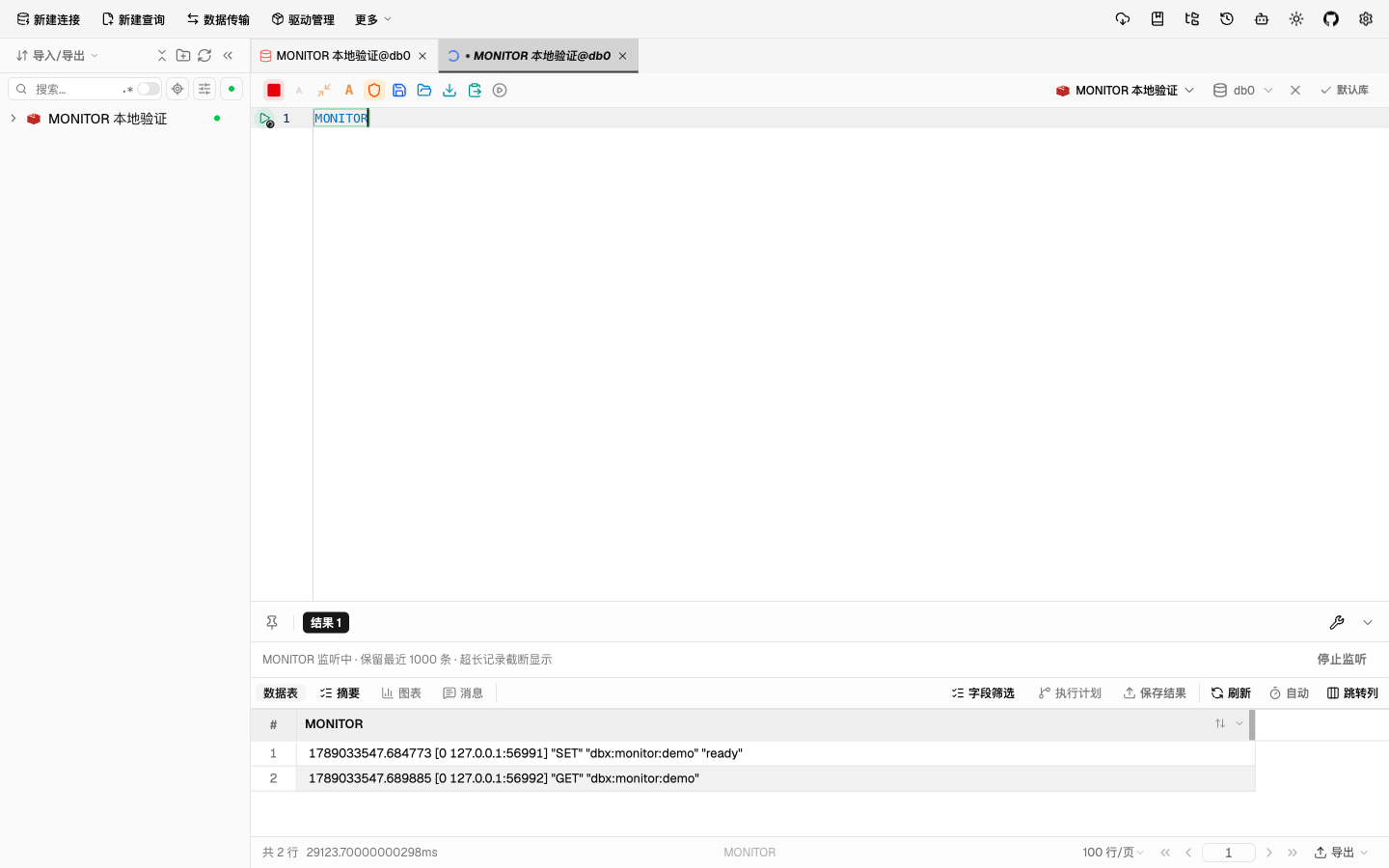
Run MONITOR on its own in the Redis query editor to receive live command logs instead of only the initial OK. Monitoring covers all databases on the connected node, regardless of the database selected in the editor.
Use Stop listening, the execution toolbar's stop button, or close the tab to release the dedicated connection. The result retains the latest 1,000 entries, with each entry limited to 16,384 characters. Stopping preserves the displayed results.
Direct Redis node connections, including their TLS and tunnel settings, are supported. For Sentinel or Cluster, create a direct connection to the node to inspect; logs are not aggregated across nodes. The Redis account needs permission to execute MONITOR, which adds server overhead while active.
Safety and Performance Guidance
- Use a read-only account or ACL for production and enable DBX read-only/production protection
- Do not replace incremental browsing with
KEYS *; prefer patterns andSCAN - Value search, memory statistics, and Slowlog can increase server load
- Stream consumer-group details read pending and consumer state; avoid unbounded high-frequency refresh
- Binary values, module commands, and vendor extensions may require the command line
- Decompressing a value is read-only and capped at 50 MiB of output; larger results show a non-blocking notice instead of being expanded
- MCP applies different permission levels to ordinary Redis writes and destructive
FLUSH*commands