
What is DBX?
DBX is an open-source, lightweight workspace for databases and data infrastructure. It brings connection management, object browsing, SQL editing, data changes, schema tools, specialized consoles, and automation into one interface across 100+ databases and data systems.
DBX does not force every system into a SQL-shaped interface. Relational databases use the query editor, data grid, and schema tools, while Redis, MongoDB, vector databases, message queues, etcd, ZooKeeper, Nacos, and similar systems use workspaces designed around their own data models.
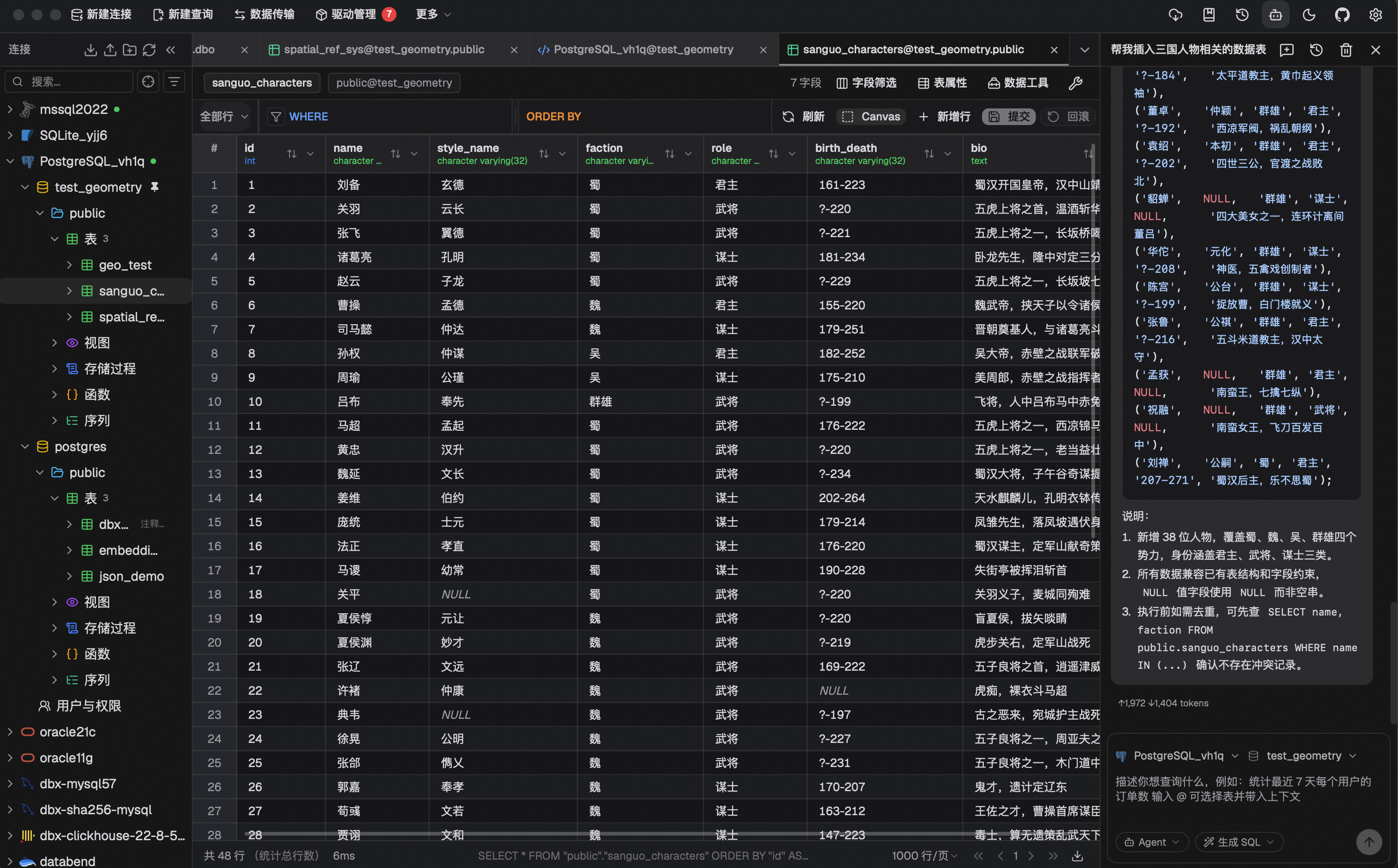
What DBX Helps You Do
Connect and separate environments
Manage local, test, staging, and production connections with groups, colors, pins, search, read-only mode, and production protection.
Query, troubleshoot, and analyze
Use metadata completion, formatting, selected execution, query history, multiple results, and execution plans for daily SQL work.
Browse and change data
Filter, sort, and edit data in a virtualized grid, then review generated SQL before writing changes.
Understand and change schemas
Browse database objects, edit table structures, compare schemas, inspect ER diagrams and lineage, and generate reviewable DDL.
Move and exchange data
Import tabular files, transfer data across connections, execute SQL files, and export schemas and data where supported.
Expose connections to tools and AI
Use the CLI, MCP, or a self-hosted backend to connect configured databases to terminals, scripts, and coding agents.
More Than SQL Databases
The connection picker groups databases and data systems by how they are actually used. Each category can open a different workspace instead of falling back to one generic query box.
| Category | Representative systems | Main DBX experience |
|---|---|---|
| Relational and compatible protocols | MySQL, PostgreSQL, SQLite, Oracle, SQL Server, Dameng, openGauss, GaussDB | SQL editor, data grid, object tree, table structure, and schema tools |
| Analytics and warehouses | ClickHouse, Doris, StarRocks, Databricks, Snowflake, Trino, BigQuery | Queries, result analysis, metadata, and driver-supported schema and export tools |
| Document, key/value, and search | MongoDB, Redis, Elasticsearch, Easysearch, Meilisearch, HBase, Cassandra | Specialized document, key, index, or column-family browsers |
| Graph, vector, and AI data | Neo4j, Qdrant, Milvus, Weaviate, ChromaDB | Graph connections plus vector collection browsing, search, and mutation flows |
| Time series | QuestDB, TDengine, IoTDB, InfluxDB | Time-series queries and system-specific connection, object, and data views |
| Message queues | Pulsar, Kafka, RocketMQ, RabbitMQ | Topics, subscriptions or consumers, messages, monitoring, permissions, and policies |
| Registry and configuration | etcd, ZooKeeper, Nacos | Key/ZNode browsing, cluster status, access control, configuration, and service management |
| Driver extensions | JDBCX, custom MySQL/PostgreSQL, optional JDBC plugins | Extend coverage through compatible protocols or vendor JDBC drivers |
Advanced features depend on the driver, protocol, and database itself. Use the Database Support matrix as the source of truth, and see Specialized Workspaces for non-relational and infrastructure interfaces.
One Workflow, Multiple Entry Points
| Entry point | Best for | Capabilities and boundaries |
|---|---|---|
| Desktop | Daily personal work, local database files, the complete workbench | Adds local files, the SQL file tree and SQL library, desktop deep links, and other OS integrations |
| Docker / Web | Self-hosting on a server and remote browser access | Shares most database workflows; paths belong to the server, and some local-file and desktop integrations are unavailable |
| CLI | Terminals, scripts, CI, and Codex workflows | Lists connections and schemas, describes tables, runs queries, builds compact context, and can open a table in Desktop |
| MCP Server | Claude Code, Cursor, Windsurf, and other AI clients | Lists connections, reads schema, and runs policy-controlled queries or commands against local storage or DBX Web |
Desktop and Web reuse the same Rust core, but they are not identical substitutes for every system integration. Choose a deployment mode based on database network placement, whether files live on the local machine or server, and whether you need desktop deep links or local SQL file management.
From Connection to Automation
Establish the connection boundary
Choose a database type, enter credentials, and configure TLS, SSH, SOCKS5, HTTP proxying, or HTTP tunneling when needed. Enable read-only mode or production protection for high-risk targets.
Understand objects and context first
Use the sidebar to inspect databases, schemas, tables, columns, indexes, foreign keys, and database-specific objects. Search, source views, ER diagrams, and field lineage help with unfamiliar systems.
Query, inspect, and change
Run SQL in the query editor or use the data grid, document/key-value browsers, and specialized consoles. DBX shows SQL or request content before execution where the workflow supports it.
Compare, move, and reuse
Use schema diff, table import, data transfer, database export, SQL file execution, query history, and the SQL library to turn one-off operations into reviewable workflows.
Add AI and automation
Use AI Ask or Agent inside the app, or expose connections, schema context, and query execution to scripts and coding agents through the CLI and MCP.
Capability Map
| Task | Product capabilities implemented in DBX | Documentation |
|---|---|---|
| Create connections | Connection categories, URL parsing, TLS, tunnels/proxies, read-only mode, production protection, and driver selection | Getting Started, Tunnels and Proxies |
| Write and run queries | CodeMirror 6, metadata completion, formatting, execution targets, multiple results, cancellation, and history | Query Editor |
| Browse and edit results | Virtual scrolling, database-side filters and sorting, inline edits, SQL preview, and multiple export formats | Data Grid |
| Understand schemas | Object tree and search, source views, table structure, schema diff, ER diagrams, and field lineage | Schema Browser, Schema Diff |
| Import, transfer, and export | CSV/TSV/JSON/Excel import, cross-connection transfer, SQL file execution, and database export | Table Import, Data Transfer |
| Manage non-relational systems | Redis, MongoDB, search, vector, HBase, message queue, registry, and configuration workspaces | Specialized Workspaces |
| Use AI and external tools | Ask/Agent, CLI, MCP, and the Web/Docker backend API | AI Assistant, CLI, MCP |
| Move personal configuration | Connection import, encrypted config export, WebDAV/Gist/Gitee sync, and SQL library sync | Config Export and Import, Cloud Sync and Backup |
Safety Model
DBX uses layered controls rather than relying on a single dangerous-operation confirmation switch:
- Database account privileges remain the final boundary. Use least-privilege accounts for production.
- Read-only connections block recognizable writes in the core query execution path and hide or disable multiple mutation entry points.
- Production protection can cover an entire connection or selected databases and requires a fresh explicit confirmation for every detected write.
- Reviewable changes show SQL first where possible in data editing, table structure, schema diff, and similar workflows.
- AI Ask mode returns an answer without executing SQL. Agent does not receive autonomous write permission in production and returns SQL to the editor for review.
- MCP policy centrally controls the connection allowlist and Read only, Data read/write, or Full access modes. It cannot bypass connection read-only state, production protection, or database privileges.
- Sensitive configuration is stored separately from normal connection JSON, and config exports can be protected with AES-GCM encryption.
See Production and Write Safety for configuration and behavior across entry points.
Boundaries to Understand
DBX is a database workbench, not a managed database service, and it does not replace database privileges, auditing, backups, or change approval. Database export is useful for lightweight backup or migration, but large production systems should use native backup tools. AI output, generated SQL, and cross-engine transfers still require human review.
- Advanced features are not force-enabled for every database; unreliable compatibility paths are hidden or degraded.
- Local paths in Docker/Web refer to the server filesystem, not the computer running the browser.
- JDBC and Agent databases require the corresponding driver or runtime and may expose fewer features than native drivers.
- The Web API primarily serves DBX Web and internal integrations and is not a stable public contract. Prefer the CLI or MCP for scripts and AI integrations.
Next Steps
Install and create a connection
Choose Desktop or Docker, then configure the first connection, network path, and safety settings.
Check database support
Review connection types, default ports, driver architecture, and the advanced feature matrix.
Configure production safety
Set read-only connections, production protection, and AI and MCP permission boundaries.
Choose an automation entry point
Select the CLI or MCP based on terminal, Codex, scripting, or AI-client workflows.